C4D 通过python导入外部.txt文件数据驱动物体
 2022年3月26日 草哥的草
未经作者授权,禁止转载
2022年3月26日 草哥的草
未经作者授权,禁止转载最近做了一个粒子动画,需要把关键帧数据导入C4D中去渲染。国内不好找这方面的资源,有点资源也收费,希望这个工作对相关人员有帮助。根据C4D官方网发布的SDK案例
URL:https://github.com/PluginCafe/cinema4d_py_sdk/tree/
824760b6aa2e6405f17b92a128ddba4f3c43ea70824760b
6aa2e6405f17b92a128ddba4f3c43ea70。
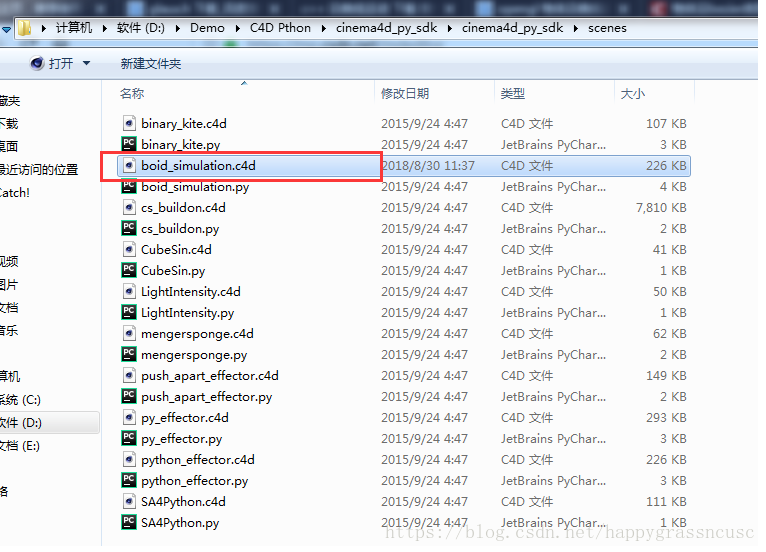
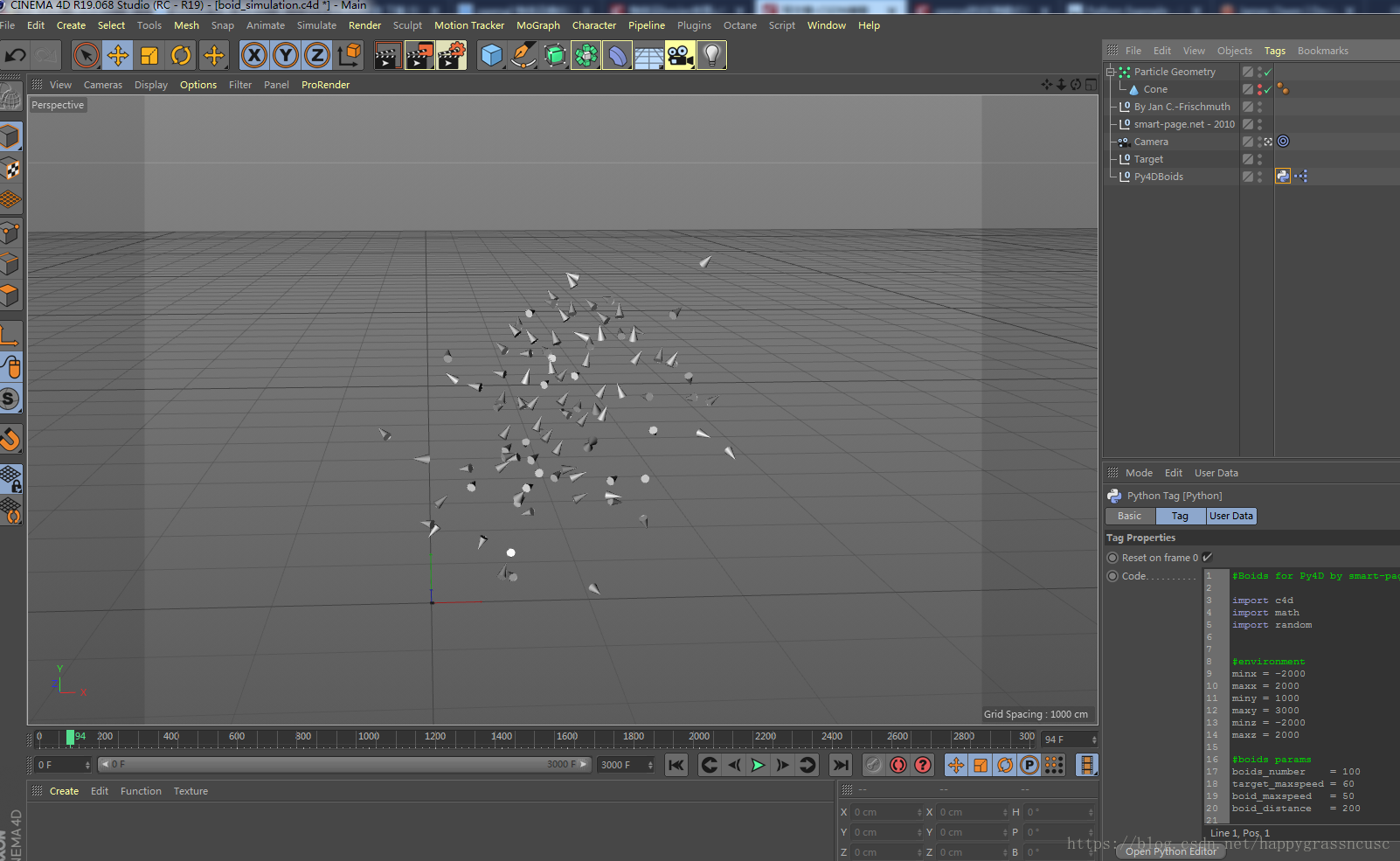
参照其中有一个做了一个导入关键帧动画数据,用python脚本导入非常方便。该案例如下图1所示:
 #Boids for Py4D by smart-page.net
    import c4d
    import math
    import random

    #environment
    minx = -2000
    maxx = 2000
    miny = 1000
    maxy = 3000
    minz = -2000
    maxz = 2000

    #boids params
    boids_number    = 100
    target_maxspeed = 60
    boid_maxspeed   = 50
    boid_distance   = 200

    frame = None
    rand = None
    target = c4d.Vector()
    targetvec = c4d.Vector(0)

    bpos = None
    bvel = None

    def main():
        global tp
        global doc
        global frame
        global bpos
        global bvel

        frame = doc.GetTime().GetFrame(doc.GetFps())
        if frame==0:
            tp.FreeAllParticles()
            tp.AllocParticles(boids_number)

        lt = c4d.BaseTime(1000)

        bpos = []
        bvel = []

        for i in tp.GetParticles():
            tp.SetLife(i, lt)

            bpos.append(tp.Position(i))
            bvel.append(tp.Velocity(i))

            moveboids(i)

        set_target()
        movetarget()


    def set_target():

        v = c4d.Vector()

        for x in bpos:
            v +=x

        v = v / len(tp.GetParticles())

        op[c4d.ID_USERDATA, 1].SetRelPos(v)


    def moveboids(c):

        bvel[c] += rule1(c) + rule2(c) + rule3(c) + rule4(c)
        bvel[c] = limitspeed(bvel[c], boid_maxspeed)

        tp.SetVelocity(c, bvel[c])

        vel=bvel[c].GetNormalized()

        side = c4d.Vector(c4d.Vector(0,1,0).Cross(vel)).GetNormalized()
        up = vel.Cross(side)
        m = c4d.Matrix(c4d.Vector(0), side, up, vel)

        tp.SetAlignment(c, m)
        tp.SetPosition(c, bpos[c] + bvel[c])


    def rule1(c):

        v = c4d.Vector()

        for i, b_pos in enumerate(bpos):
            boid_pos = bpos[c]

            if b_pos == boid_pos:
                continue

            v += boid_pos - b_pos

        v /= len(tp.GetParticles())

        return (bvel[c] -v) / 100


    def rule2(c):

        d = 0
        k = 0

        for i, b_pos in enumerate(bpos):
            if (b_pos - bpos[c]).GetLength() < boid_distance:
                k += 1
                pos = bpos[c]
                dif = (pos - b_pos)

                if dif.GetLength() >= 0:
                    dif = math.sqrt(boid_distance) - dif
                elif dif.GetLength() < 0:
                    dif = -math.sqrt(boid_distance) - dif

                d += dif

        if k == 0: return

        return bvel[c] - d / 4


    def rule3(c):

        v = c4d.Vector()

        for i in bpos:
            v += bvel[c]

        v /= len(tp.GetParticles())

        return bvel[c] + v / 30


    def rule4(c):

        return (target - bpos[c]) / 100


    def movetarget():

        global target
        global targetvec

        rand = random.Random(1)
        rand.seed(frame)

        if target.x < minx or target.y < miny or target.z < minz:
            targetvec.x += rand.random() * target_maxspeed
            targetvec.y += rand.random() * target_maxspeed
            targetvec.z += rand.random() * target_maxspeed

        if target.x > maxx or target.y > maxy or target.z > maxz:
            targetvec.x -= rand.random() * target_maxspeed
            targetvec.y -= rand.random() * target_maxspeed
            targetvec.z -= rand.random() * target_maxspeed

        targetvec = limitspeed(targetvec, target_maxspeed)

        target += targetvec


    def limitspeed(v, speed):

        if v.GetLength() > speed:
           v = v*(speed / v.GetLength())

        return v
当然我不需要这些函数,粒子的位置与方向数据从外部txt文件导入。我的数据已经通过opengl计算好,记录成文本文件。文件格式内容示例如下图3所示:
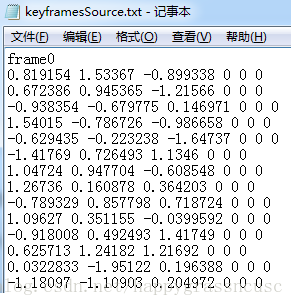
图3 外部数据
图3中每一帧中有多行数据,每一帧的第一行是提示文字用来表示第几帧,后续每一行数据赋给一个粒子。一行数据有6个,前3个为坐标、后3个为方向。现在只需将文件导入,并分析出每一帧中的数据,将每一帧中每一行数据分别赋给粒子。将案例中的代码修改,并得到下面的示例代码Code2:
code 2:
# Boids for Py4D by smart-page.net

import c4d
import math
import random

# boids params
boids_number = 100    #粒子数量
currentframe = None	#当前动画帧

frame_step = boids_number+1  #导入的文件中每一帧的数据,+1是把"frameX"这一行也算上
frame_total = 0

def main():
    global tp
    global doc
    global currentframe

    currentframe = doc.GetTime().GetFrame(doc.GetFps())  #获取当前帧
    if currentframe == 0:
        tp.FreeAllParticles()
        tp.AllocParticles(boids_number)   #生成粒子

    lt = c4d.BaseTime(1000) #粒子的生命

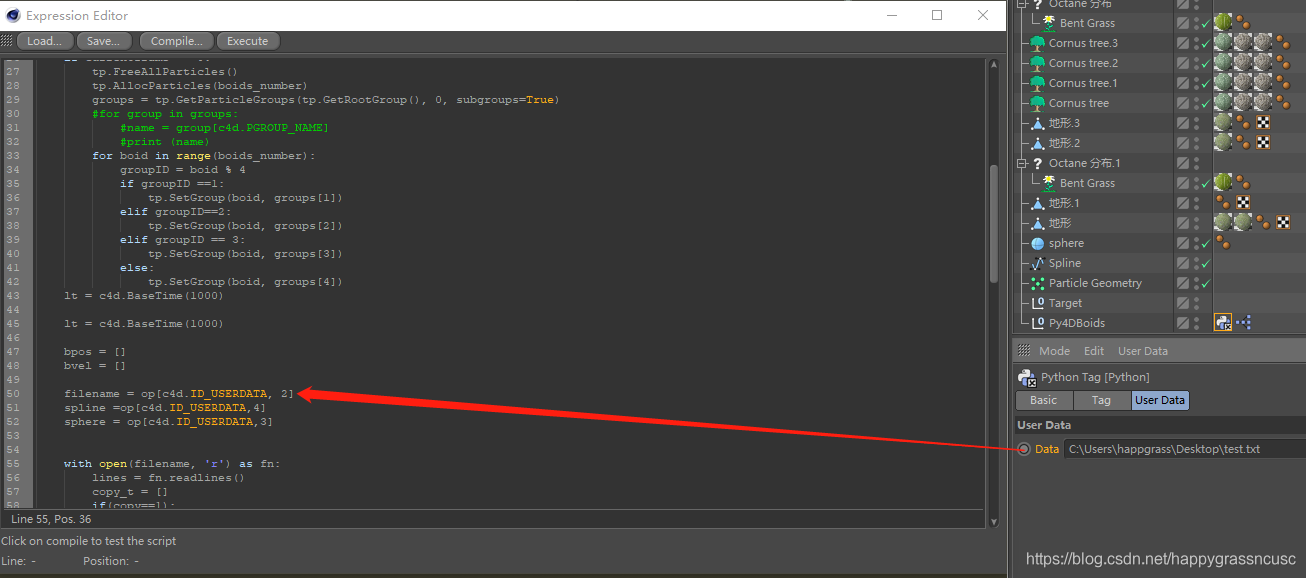
    filename = op[c4d.ID_USERDATA, 2]   #读入的数据,本文后面解释如何添加该数据
    with open(filename, 'r') as fn:   # 分析打开的外部文件
        lines = fn.readlines()
        frame_total = int(len(lines) / frame_step)
        frame = 0
        i=1
        for frame in range(frame_total):
            if frame == currentframe:
                t_lines = lines[frame * frame_step:frame * frame_step + frame_step - 1]  #以frame_step为步长提取每一帧的数据。或许还有更好的方法,暂时没去优化。
                if i == tp.GetParticles():
                    i=1
                for line in t_lines:
                    if line == t_lines[0]:   #将每一帧的第一行提示文字过滤掉。
                        print(line)
                        continue
                    else:
                        x, y, z, dx, dy, dz = line.split()
                        #print(x, y, z, dx, dy, dz)
                        pos = c4d.Vector(float(x), float(y) , float(z))  #粒子的坐标
                        vol = c4d.Vector(float(dx) , float(dy), float(dz) )  #粒子的方向

                        tp.SetLife(i, lt)  #  set life time for particle i

                        vel = vol.GetNormalized()  #下面几行是将方向向量作用到粒子
                        side = c4d.Vector(c4d.Vector(0, 1, 0).Cross(vel)).GetNormalized()
                        up = vel.Cross(side)
                        m = c4d.Matrix(c4d.Vector(0), side, up, vel)
                        tp.SetAlignment(i, m)

                        tp.SetPosition(i,pos)  #  set postion(x,y,z)
                        #tp.SetVelocity(i,vol)
                        i=i+1
    c4d.EventAdd()
if __name__=='__main__':
    main()
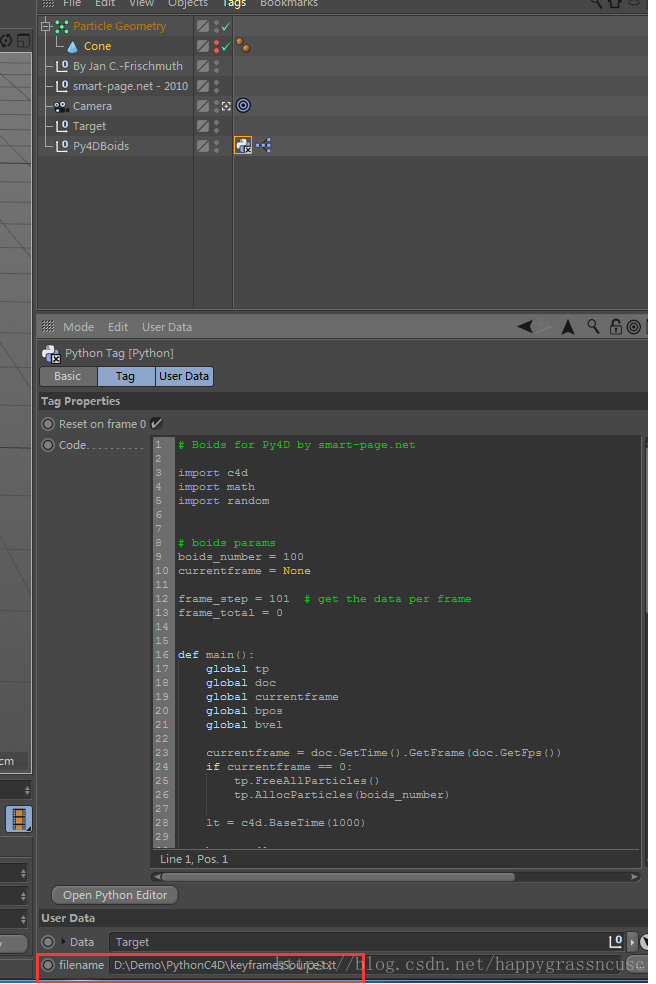
文件导入时只需在C4D中添加文件,如下图4:
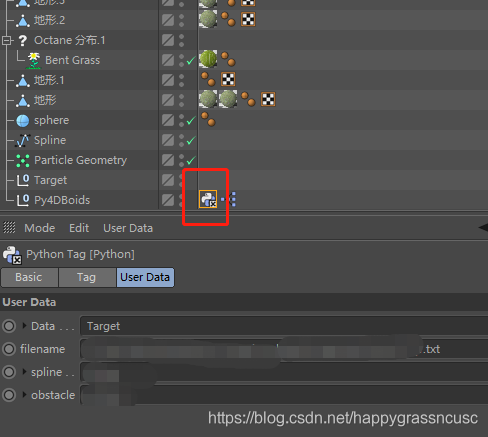 2)然后,进入用户数据管理器,如下图所示。
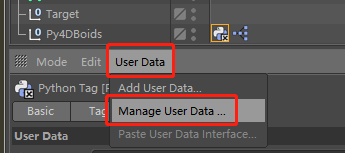 3)接着,增加一个data,如下图所示。
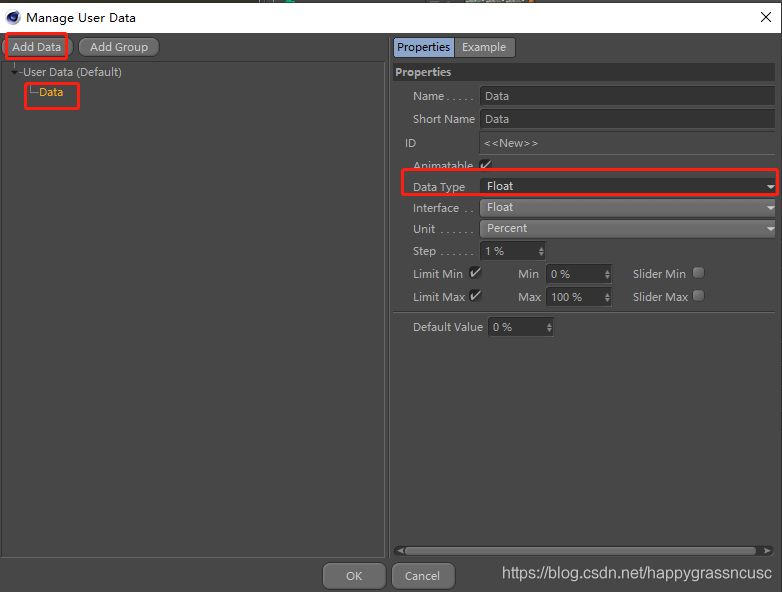
4)在数据类型(Data Type)中选择“Filename”,如下图所示。
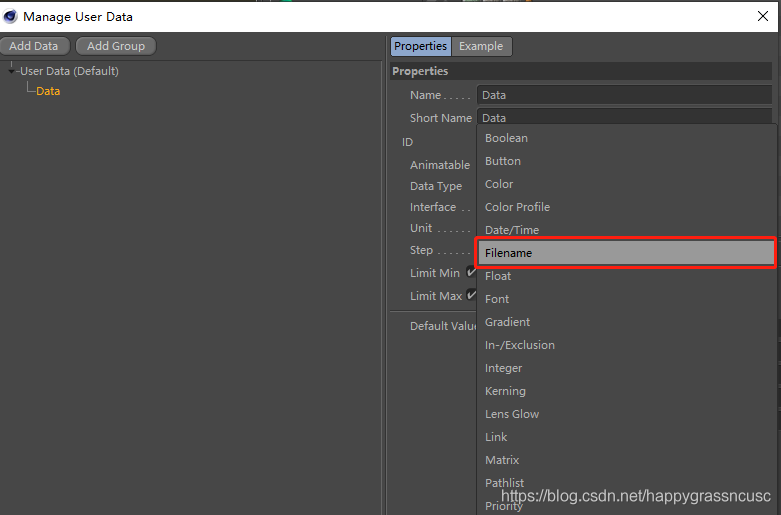
5)保存。然后,去选择电脑上txt文件。如下图所示。
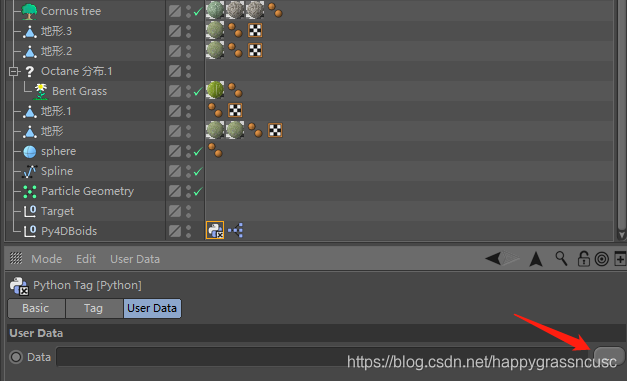
6)最关键一步,鼠标左键按住托动data到python脚本中,将数据赋给一个变量。如下图中所示,外部数据源赋给了变量filename。
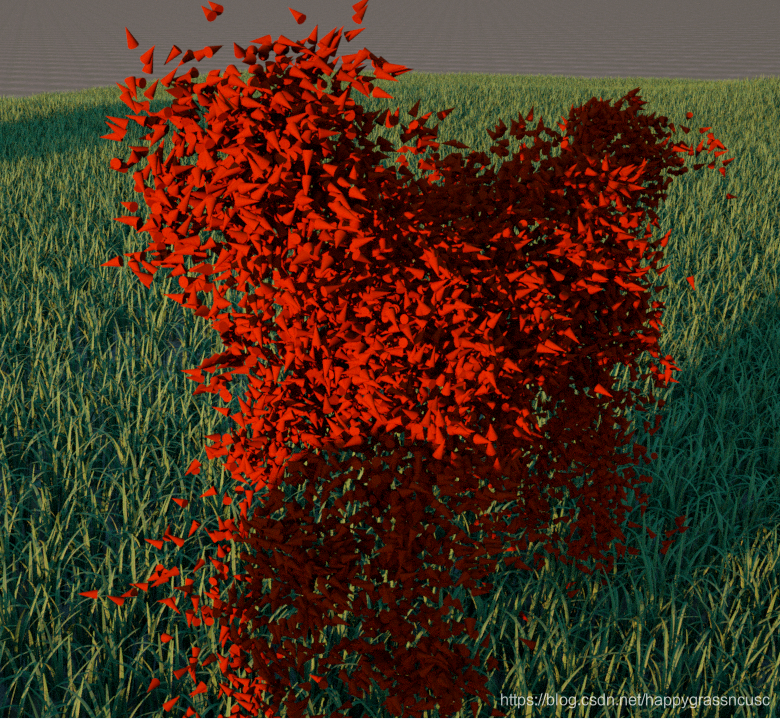
7)最后,渲染的结果展示。
用昆虫构成快速奔跑的马:
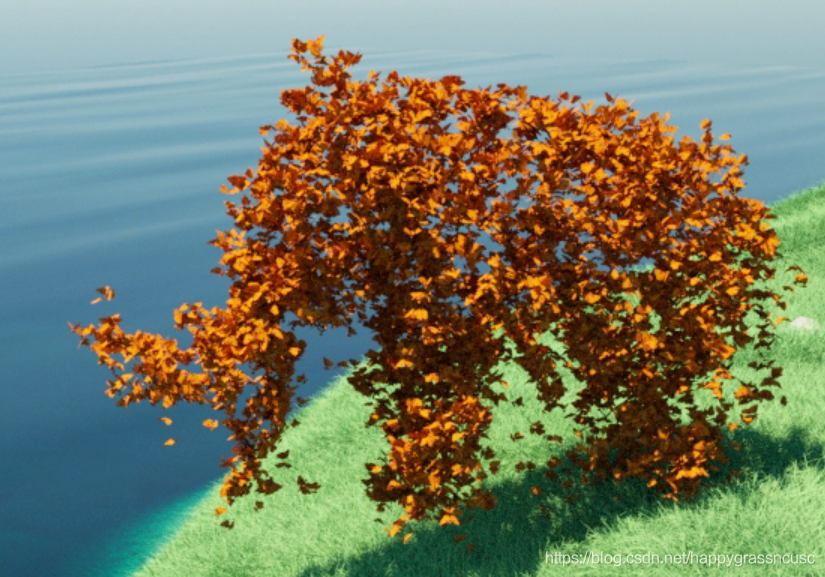
昆虫构成猛犸象:
昆虫构成鲨鱼

终于发表了论文(欢迎引用,谢谢):
Chen Q, Luo G, Tong Y, et al. Shape‐constrained flying insects animation[J]. Computer Animation and Virtual Worlds, 2019: e1902.
论文DEMO:https://www.youtube.com/watch?v=4SfVb3ZEQAw
C4D 开发人员支持文档URL(Python: https://developers.maxon.net/docs/Cinema4DPythonSDK/html/index.html)。
TP particle 开发文档参见:
https://public.niklasrosenstein.com/
cinema4d/docs/python/R13.058/modules/
c4d.modules/thinkingparticles/TP_MasterSystem/index.html。
That’s all. 希望对相关人员有帮助。
————————————————
版权声明:本文为CSDN博主「草哥的草」的原创文章,遵循CC 4.0 BY-SA版权协议,转载请附上原文出处链接及本声明。
原文链接:https://blog.csdn.net/happygrassncusc/article/details/82527948